
What Does Registry Defrag Do, and How Do I Use It in WinZip System Utilities Suite?
Registry Defrag makes the Windows registry smaller and more compact. Here is how to run it.
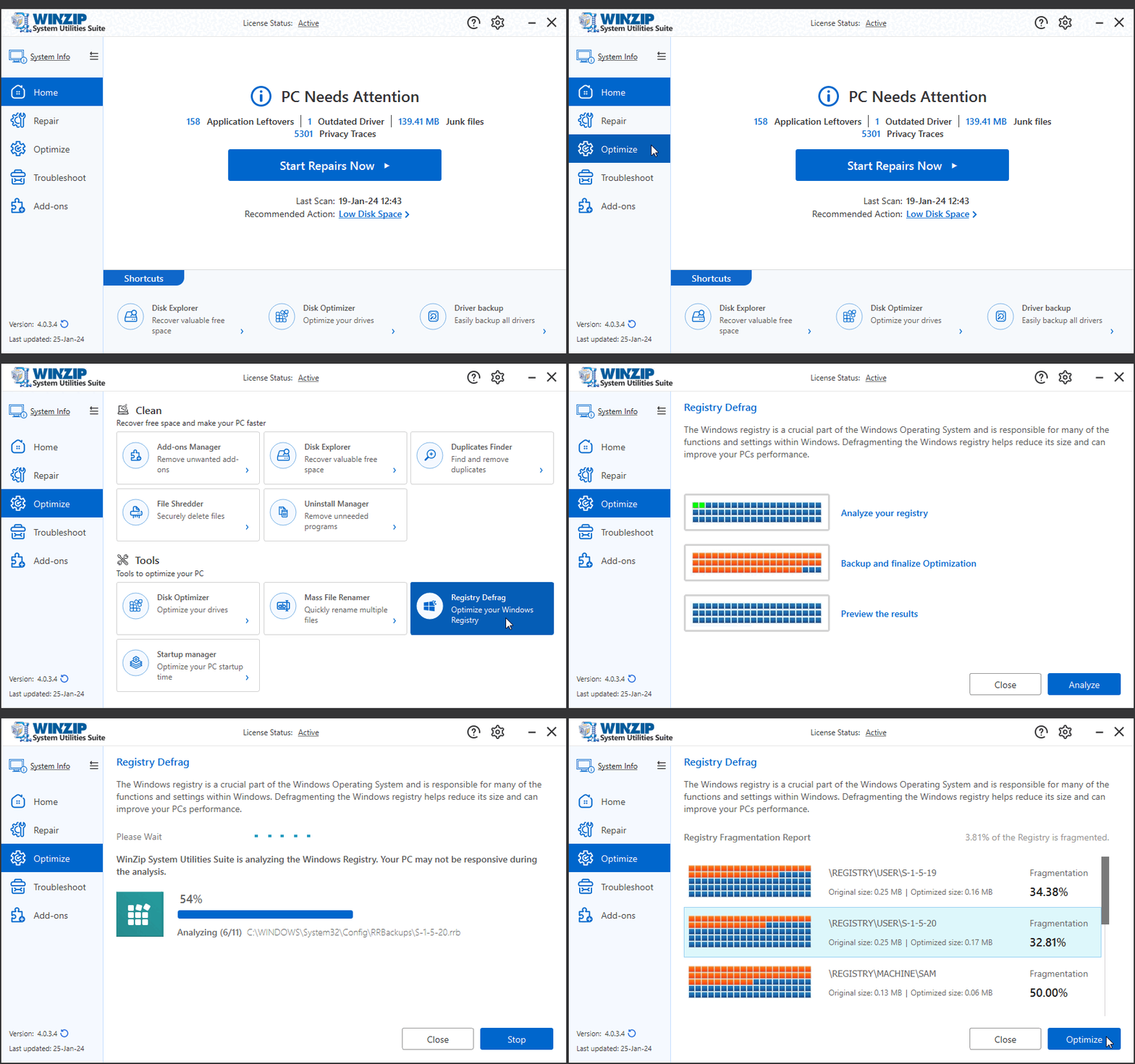
Registry Defrag removes gaps in the Windows registry files, so the registry takes less space. To run it, open WinZip System Utilities Suite, select Optimize > Registry Defrag, select Analyze, then select Optimize.
What Registry Defrag Does
The Windows registry is a database where Windows and your programs store their settings. Over time, programs add and remove entries, and this leaves empty space inside the registry files. Registry Defrag rebuilds these files without the empty space. The report shows the size of each part before and after, and how much of it is fragmented.
Before You Start
- Save your work and close other programs. To finish the job, your computer may need to restart.
- Check that WinZip System Utilities Suite will create a restore point. Open Settings with the gear icon and make sure Create System Restore Point Before Optimizing is on. System Protection must also be turned on for your Windows drive. It is off by default in Windows.
Run Registry Defrag
- Open WinZip System Utilities Suite.
- In the side menu, select Optimize.
- Under Tools, select Registry Defrag.
- Select Analyze. The program checks your registry.
- Review the Registry Fragmentation Report. It shows how much of the registry is fragmented, and the original and optimized size of each part.
- Select Optimize to start the defrag.
If Your Computer Restarts
To complete the defrag, the program may schedule the last part to run the next time your computer starts. After that, Windows loads as normal. Do not turn off the computer while this runs.
Related Help
- Will WinZip System Utilities Suite back up my computer before performing repairs?
- How do I undo or restore repairs made by WinZip System Utilities Suite?
- How do I manage and improve the startup time of my PC?
Still need help? Contact our support team.
Frequently Asked Questions
Is Registry Defrag the same as cleaning the registry?
No. Registry Defrag does not remove settings. It rebuilds the registry files without the empty space between entries, so they take less space.
Can I undo a registry defrag?
WinZip System Utilities Suite creates a Windows restore point before it optimizes, if Create System Restore Point Before Optimizing is on in Settings and System Protection is turned on for your Windows drive. You can use Windows System Restore to go back to that point. System Restore does not change your personal files.
How often should I run Registry Defrag?
There is no fixed rule. Run Analyze from time to time, for example once a month, and optimize when the report shows that part of the registry is fragmented.
Sources
Related Questions
- How Can I Get Detailed Information About My PC and Its Hardware?
- How Can I Learn More About the Processes Running on My PC?
- How Do I Backup All My Existing Computer Drivers?
- How Do I Completely Uninstall Unnecessary Programs from My PC?
- How Do I Manage and Improve the Startup Time of My PC?
- How Do I Use the Crash Helper to Troubleshoot Blue Screen Errors and Crashes?