
WinZip System Utilities Suite
How Do I Use the Crash Helper to Troubleshoot Blue Screen Errors and Crashes?
System Utilities Suite can help you identify, troubleshoot and fix blue screen or STOP errors quickly and painlessly, saving you a whole lot of time and grief!
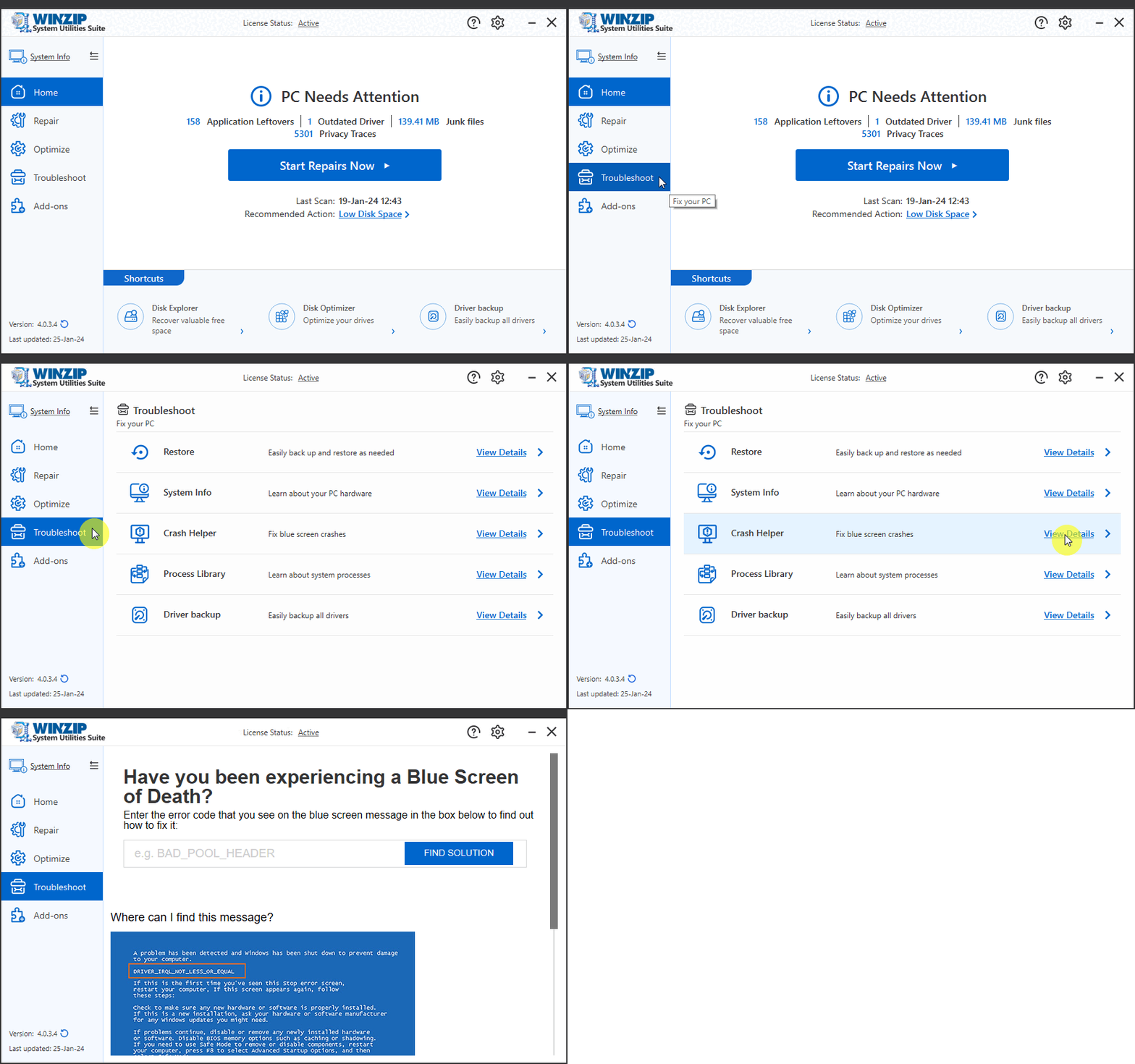
If you have recently encountered a blue screen error on your PC, launch System Utilities Suite, click on the Troubleshoot button from the side menu, then click the Crash Helper tile. In the screen that appears, enter the error code (For example: 0x000000F4) you noticed on the blue screen message and click the Find Solution button to find out more about the error and learn how to fix it.
Related Questions
- How Can I Get Detailed Information About My PC and Its Hardware?
- How Can I Learn More About the Processes Running on My PC?
- How Do I Backup All My Existing Computer Drivers?
- How Do I Completely Uninstall Unnecessary Programs from My PC?
- How Do I Manage and Improve the Startup Time of My PC?
- How to Increase Available Hard Drive Space