
How to Uninstall WinZip System Utilities Suite
Remove WinZip System Utilities Suite from your PC in a few clicks, from Windows Settings or Control Panel.
Uninstall WinZip System Utilities Suite the same way as any other Windows program: select Start > Settings > Apps > Installed apps, find WinZip System Utilities Suite, and select More > Uninstall. Then follow the prompts.
Before You Start
- Close WinZip System Utilities Suite if it is open.
- Uninstalling does not cancel your subscription. To stop the automatic renewal or to ask for a refund, see Refunds and Cancellations.
- If you plan to install the program again, keep your license key. You can find it in your purchase confirmation email.
Uninstall From Windows Settings
- Select Start > Settings > Apps > Installed apps. On Windows 10, select Start > Settings > Apps > Apps & features.
- Find WinZip System Utilities Suite in the list.
- Select More > Uninstall.
- If Windows asks you to confirm, select Uninstall again.
- The WinZip System Utilities Suite uninstaller opens. Follow the prompts until it finishes.
Uninstall From Control Panel
Use Control Panel if the program does not uninstall from Settings.
- In the search box on the taskbar, type Control Panel and select it in the results.
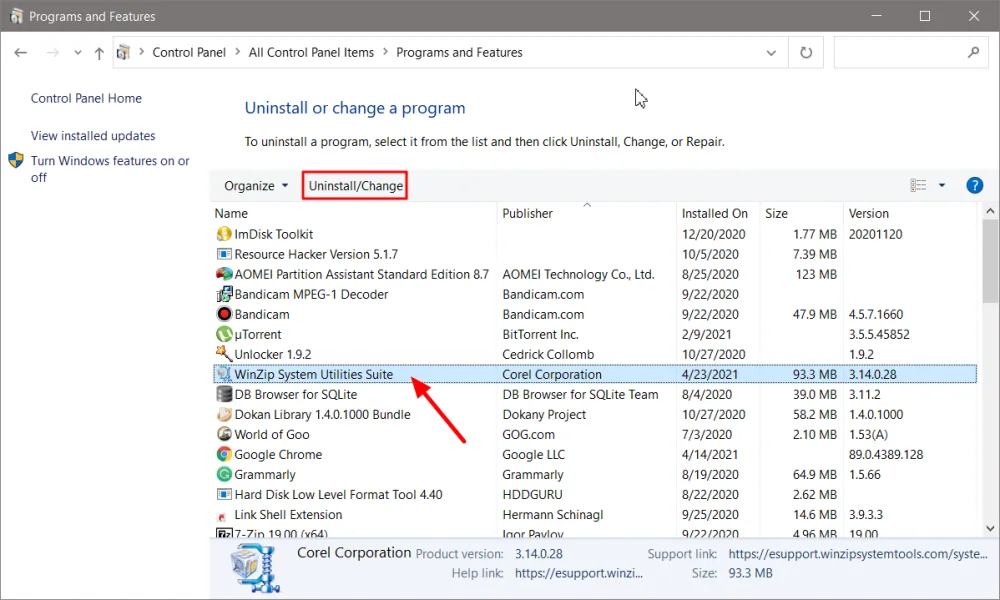
- Select Programs > Programs and Features.
- Right-click WinZip System Utilities Suite and select Uninstall or Uninstall/Change.
- Follow the prompts until the uninstaller finishes.
How to Tell It Worked
WinZip System Utilities Suite is no longer in the Installed apps list or in Programs and Features. If you still see it, close the list and open it again.
If It Didn't Work
- Restart your computer, then try the steps again.
- If Settings did not remove it, use the Control Panel steps above.
- On Windows 10, you can run the Microsoft Program Install and Uninstall troubleshooter. It fixes problems that stop programs from being removed. See the Microsoft page in the sources below.
- Still stuck? Contact our support team. Tell us your Windows version and what happened when you tried to uninstall.
Related Help
Frequently Asked Questions
Does uninstalling WinZip System Utilities Suite cancel my subscription?
No. Your subscription keeps renewing until you cancel it. Use the Cancel your subscription link in your order confirmation email, or see the Refunds and Cancellations page in the Support Center.
Can I get a refund after I uninstall?
Yes, if you ask within 30 days of your purchase. Send a refund request with your order reference number. The Refunds and Cancellations page explains how.
Can I install WinZip System Utilities Suite again later?
Yes. Download it again from the WinZip System Utilities Suite product page and activate it with your license key. If you moved to a new computer or reinstalled Windows, contact support so we can release your license for the new setup.
I only want to stop it from opening when Windows starts. Do I need to uninstall it?
No. Open Settings with the gear icon in the program, turn off Run at startup and select Save.
Sources
Related Questions
- How to Download and Install WinZip System Utilities Suite
- How Do I Reinstall System Utilities Suite on My Computer?
- How Do I Upgrade to the Latest Version of System Utilities Suite?
- How Do I Repair My PC to Improve Its Performance and Stability?
- How Do I Activate WinZip System Utilities Suite?
- What Is WinZip System Utilities Suite, and How Does It Help My Computer?