
How Do I Activate WinZip System Utilities Suite?
Paste your license key into WinZip System Utilities Suite to unlock its full functionality.
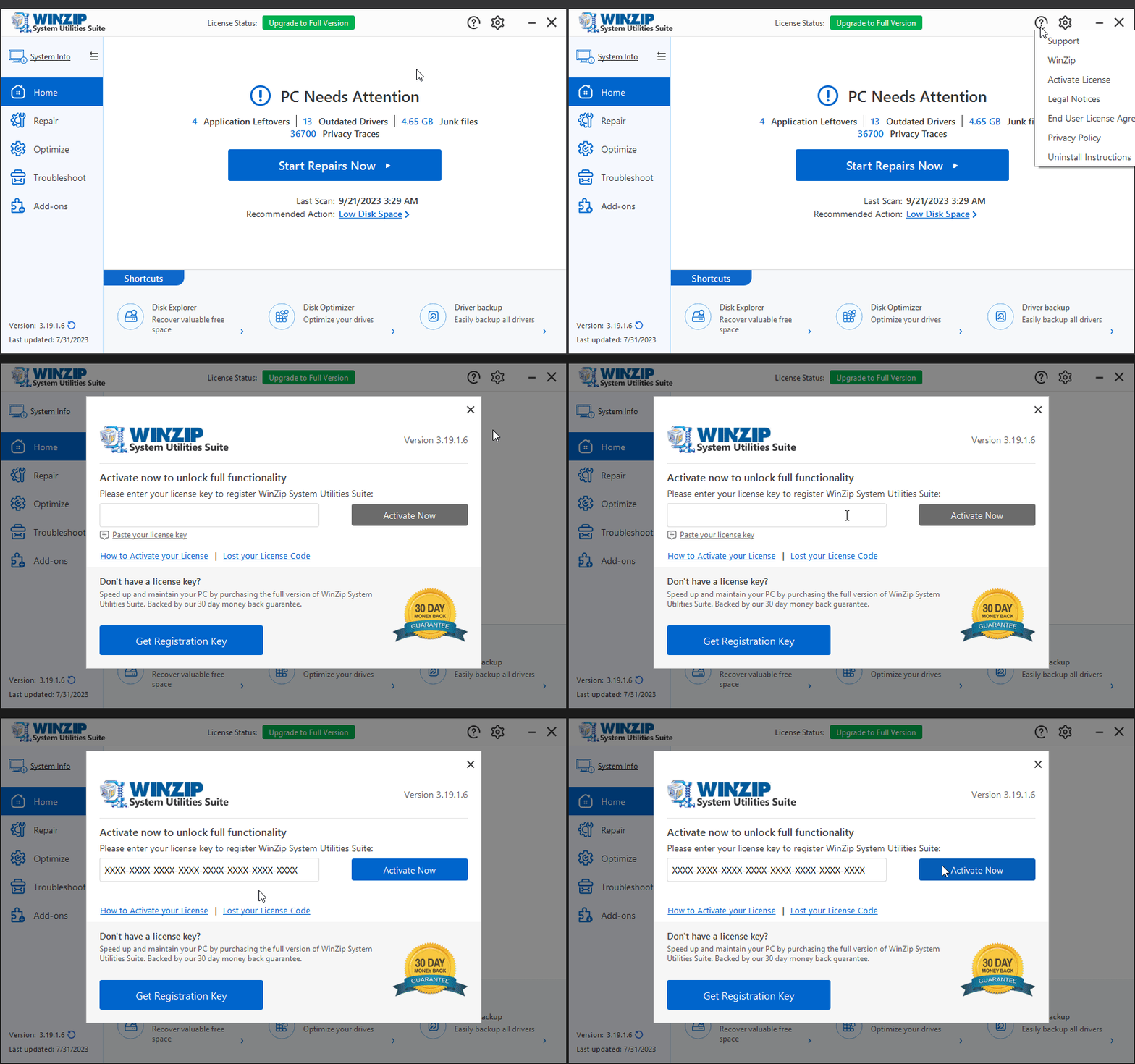
Copy the license key from your purchase confirmation email. Then, in WinZip System Utilities Suite, select the (?) button > Activate License, paste the key and select Activate Now.
Before You Start
- You need your license key. It is in the purchase confirmation email from Cleverbridge, the company that handles WinZip orders. If you cannot find it, use the Lost your License Key page to get it again.
- Make sure your computer is connected to the internet.
- Make sure WinZip System Utilities Suite is installed. If it is not, see How to Download and Install WinZip System Utilities Suite.
Activate Your License
- Open your purchase confirmation email. Select the license key, then press Ctrl + C to copy it. You can also right-click the selected key and select Copy.
- Open WinZip System Utilities Suite.
- Select the (?) button in the top-right corner of the program window.
- Select Activate License. The activation window opens.
- Select the Paste your license key link under the empty box. You can also click in the box and press Ctrl + V.
- Select Activate Now.
How to Tell It Worked
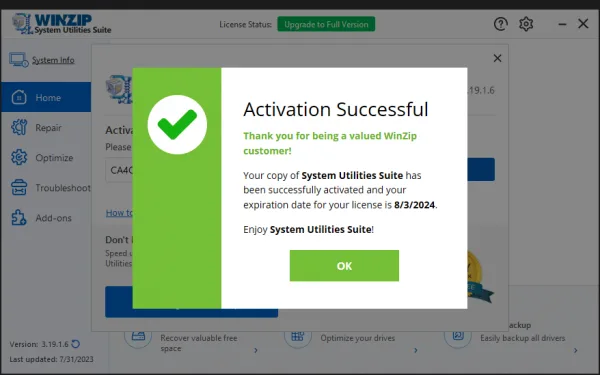
An Activation Successful message opens. It shows the date your license expires. Select OK to close it.
At the top of the program window, License Status now shows Active. Before activation it shows an Upgrade to Full Version button.
If It Didn't Work
- If the key is not accepted, see Why Is My WinZip System Utilities Suite License Key Not Accepted?
- If you have a new computer or reinstalled Windows, see I have a new computer or reinstalled Windows. What do I need to do?
- For other license questions, go to Manage Your License.
- Still stuck? Contact our support team. Include your order reference number.
Frequently Asked Questions
Where do I find my license key?
It is in the purchase confirmation email from Cleverbridge, which processes WinZip orders. If you cannot find the email, use the Lost your License Key page (winzipsystemtools.com/lostcode/) to get your key again.
I do not have a license key yet. How do I get one?
In the activation window, select Get Registration Key to buy one. You can also buy from the WinZip System Utilities Suite product page. Every purchase has a 30-day money-back guarantee.
Can I use my license on a new computer?
Your license is linked to the computer you activated it on. If you replace your computer or reinstall Windows, contact our support team. They can release the license so you can activate it again.
Will activating WinZip System Utilities Suite activate my other WinZip programs?
No. Each WinZip product has its own license key. A WinZip System Utilities Suite key only activates WinZip System Utilities Suite.
Sources
Related Questions
- I Have Recently Upgraded My Computer Hardware / Reinstalled the Operating System / Replaced It with a New Computer. What Do I Need to Do?
- I Just Purchased System Utilities Suite and Have Not Received a Purchase Confirmation with the Necessary Details. What Can I Do?
- Why Is My WinZip System Utilities Suite License Key Not Accepted?
- How Do I Repair My PC to Improve Its Performance and Stability?
- How to Download and Install WinZip System Utilities Suite
- How Do I Reinstall System Utilities Suite on My Computer?