
How to Change the Language of WinZip System Utilities Suite
Switch WinZip System Utilities Suite to another language from its Settings window.
To change the language, open Settings with the gear icon in WinZip System Utilities Suite, choose a language in the Language list and select Save. This changes the language of the program only, not the language of Windows.
Change the Program Language
- Open WinZip System Utilities Suite.
- Select the gear icon in the top-right corner of the program window. The Settings window opens.
- On the right side, under Language, open the drop-down list.
- Select the language you want.
- Select Save.
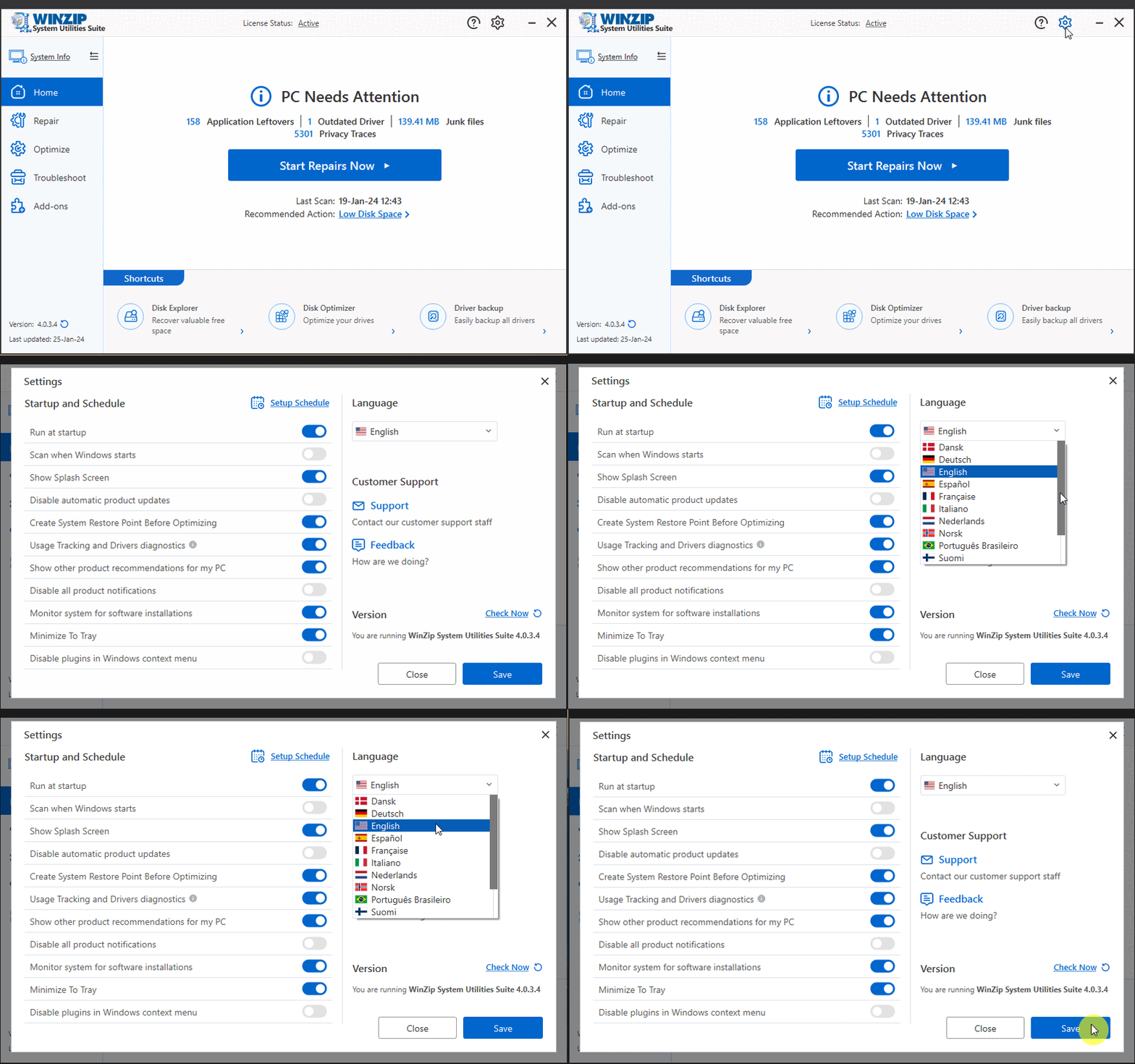
How to Tell It Worked
The menus, buttons and messages in WinZip System Utilities Suite show in the language you picked. If you want to go back, repeat the steps and choose your old language.
Related Help
- How can I change the settings and preferences of WinZip System Utilities Suite?
- How to stop WinZip System Utilities Suite from starting with Windows
Still need help? Contact our support team.
Frequently Asked Questions
Which languages can I choose?
The Language list includes Danish (Dansk), German (Deutsch), English, Spanish (Español), French, Italian (Italiano), Dutch (Nederlands), Norwegian (Norsk), Brazilian Portuguese (Português Brasileiro), Finnish (Suomi) and others. Scroll the list to see them all.
Does this change the language of Windows?
No. The Language setting only changes WinZip System Utilities Suite. Your Windows language and your other programs stay the same.
The program is in a language I cannot read. How do I find the setting?
Look for the gear icon in the top-right corner of the program window, next to the question mark icon. In the window that opens, the Language list is in the top-right area and shows a small flag. Pick your language and select the large blue button in the bottom-right corner to save.
Sources
Related Questions
- How Can I Change the Settings and Preferences of System Utilities Suite?
- How Do I Check for Program Updates for System Utilities Suite?
- How Do I Create a Schedule to Run System Utilities Suite?
- How to Stop WinZip System Utilities Suite from Starting with Windows
- How Do I Repair My PC to Improve Its Performance and Stability?
- How Do I Activate WinZip System Utilities Suite?