
How to Back Up Your Drivers Before Updating in WinZip Driver Updater
Save a copy of your current drivers in WinZip Driver Updater so you can go back to them later.
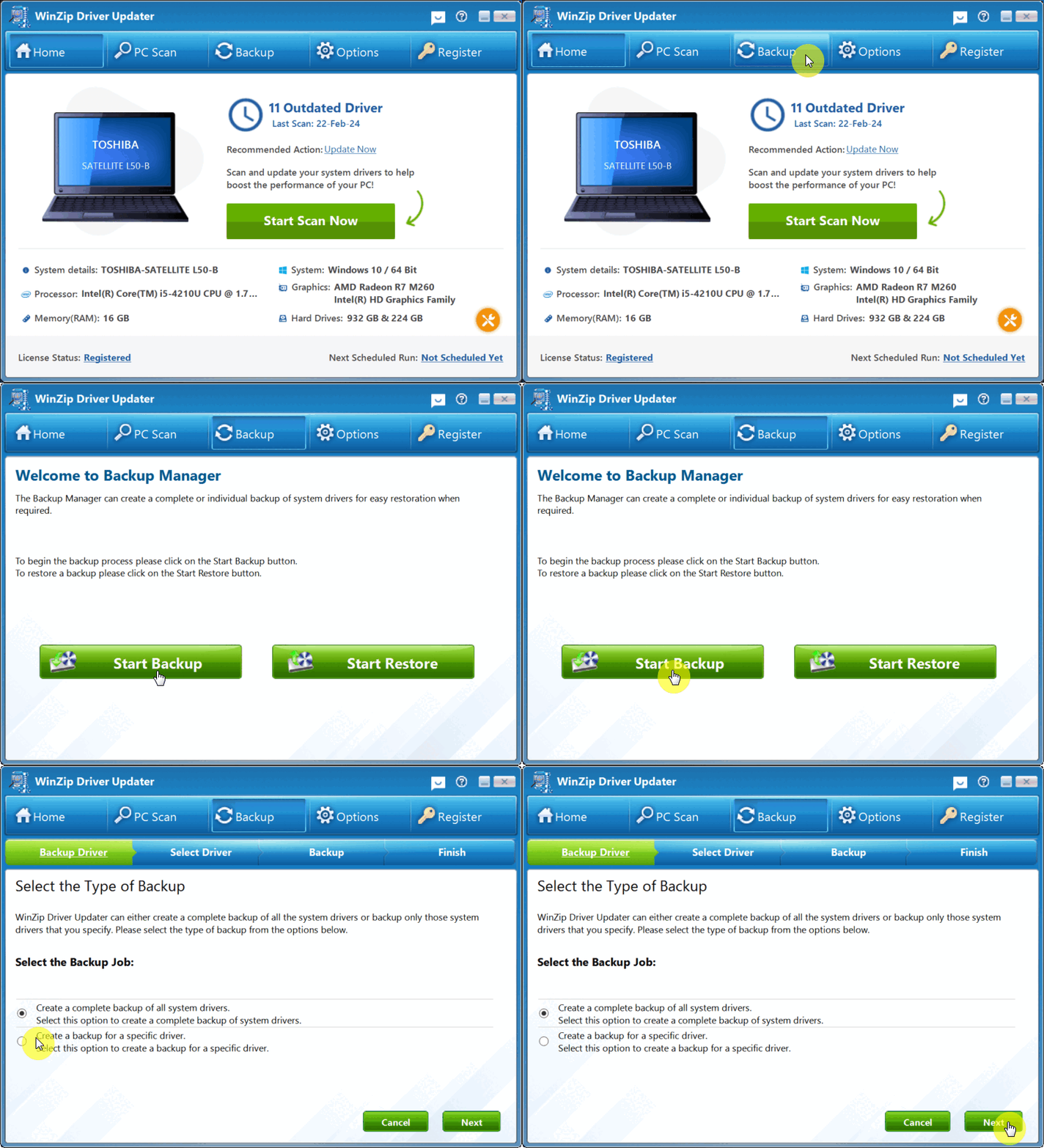
Open WinZip Driver Updater, select Backup in the top menu, then select Start Backup. Choose a complete backup of all drivers or a backup of one driver, select Next and follow the steps.
Back Up Your Drivers
- Open WinZip Driver Updater.
- Select Backup in the top menu. The Welcome to Backup Manager screen opens.
- Select Start Backup.
- On the Select the Type of Backup screen, choose one option:
- Create a complete backup of all system drivers
- Create a backup for a specific driver
- Select Next.
- Follow the remaining steps of the wizard (Select Driver, Backup and Finish) to complete the backup.
Backups Made When You Update
When you update drivers with WinZip Driver Updater, it backs up your original drivers before it installs the new ones. In Options > General, you can also turn on Create Restore Point Before Updating Drivers, so Windows saves a restore point first.
Restore a Backup Later
If a new driver causes a problem, you can go back to the drivers you saved. See how to roll back driver updates.
Frequently Asked Questions
Should I back up all drivers or just one?
Choose a complete backup before you update many drivers at once. Choose a backup for a specific driver when you only plan to update one device.
Do I need to back up manually before every update?
No. WinZip Driver Updater backs up your original drivers when it installs updates. A manual backup is useful when you want a copy at a time you choose.
How often should I back up my drivers?
We recommend a driver scan at least once a month. A backup at the same time keeps a recent copy of your drivers.
Can I delete old backups?
Yes. Select Backup, then Start Restore. Select a backup in the Drivers Backup List and select Delete Backup.
Sources
Related Questions
- How to Roll Back Driver Updates in WinZip Driver Updater
- How Do I Use WinZip Driver Updater to Update My Drivers? (Quick Guide)
- Why Won't WinZip Driver Updater Download and Install Updates After I Bought It?
- Why Can't I Complete a Scan with WinZip Driver Updater?
- What Are Device Drivers, and Why Use WinZip Driver Updater?
- How to Upgrade to the Latest Version of WinZip Driver Updater