
WinZip Mac Optimizer
How Do I Use Uninstaller to Uninstall Applications in Mac Optimizer?
No longer sold
WinZip Mac Optimizer is no longer sold. This answer stays here for existing customers.
The Uninstaller feature in Mac Optimizer can be far more convenient than hunting down an uninstaller within the Applications folder. You can see all the programs you have installed in one location, similar to the Programs and Features app on a Windows PC. Then, you can select any installed application and uninstall it.
To use Uninstaller:
- Launch Mac Optimizer.
- Click Uninstaller.
- Click Scan.
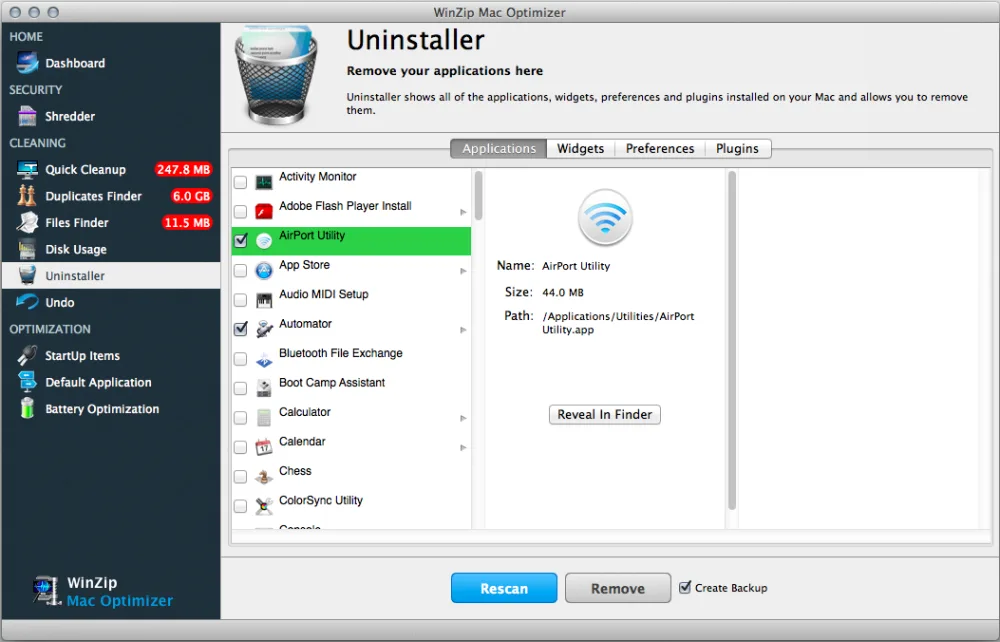
- You can click on the Applications, Widgets, Preferences or Plugins tab to view each type of app.
- Select any app you no longer need.
- Click Remove to uninstall it.
Related Questions
- How Do I Change the Default Application to Open a Specific File Extension Using Mac Optimizer?
- How Do I Improve the Startup Speed of My Mac Optimizer?
- How Do I Set Up Battery Optimization Profiles Using Mac Optimizer?
- How Do I Use Disk Usage to Find the Folders and Files That Take Up the Most Space in Mac Optimizer?
- How Do I Use Duplicates Finder to Remove Duplicate Files in Mac Optimizer?
- How Do I Use Files Finder to Find Large Files, or Any Files, in Mac Optimizer?