
WinZip Mac Optimizer
How Do I Improve the Startup Speed of My Mac Optimizer?
No longer sold
WinZip Mac Optimizer is no longer sold. This answer stays here for existing customers.
Mac Optimizer makes managing the applications that start when you start up your Mac easy. All you need to do is to follow these steps:
- Launch Mac Optimizer
- Click Startup Items
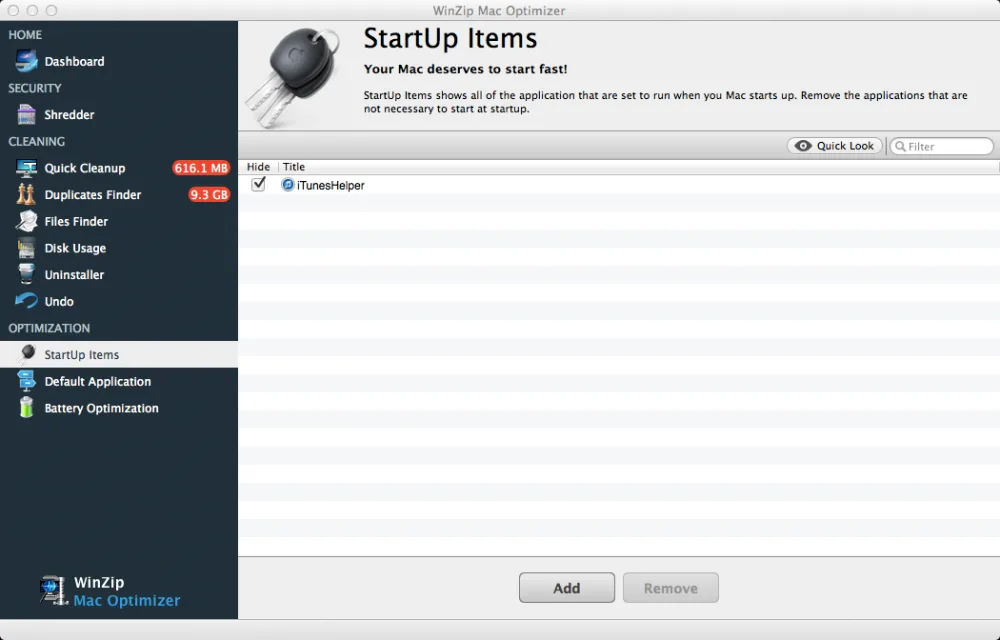
- Here you will see a list of all items that start when you start your Mac.
- Items that have a check mark next to them are set to hide after starting up.
- You can choose to make applications hide after starting by selecting them. All changes are saved immediately.
- If you would like to remove an application from starting completely you need to click the name of the application and click Remove.
- You can also add items to your startup by clicking Add and selecting an application or file you would like to open when your Mac starts.
Related Questions
- How Do I Change the Default Application to Open a Specific File Extension Using Mac Optimizer?
- How Do I Set Up Battery Optimization Profiles Using Mac Optimizer?
- How Do I Use Disk Usage to Find the Folders and Files That Take Up the Most Space in Mac Optimizer?
- How Do I Use Duplicates Finder to Remove Duplicate Files in Mac Optimizer?
- How Do I Use Files Finder to Find Large Files, or Any Files, in Mac Optimizer?
- How Do I Use Quick Cleanup to Clean Unnecessary Files in Mac Optimizer?