
How Do I Stop WinZip Driver Updater from Running at Startup?
Turn off one setting so WinZip Driver Updater opens only when you want it to.
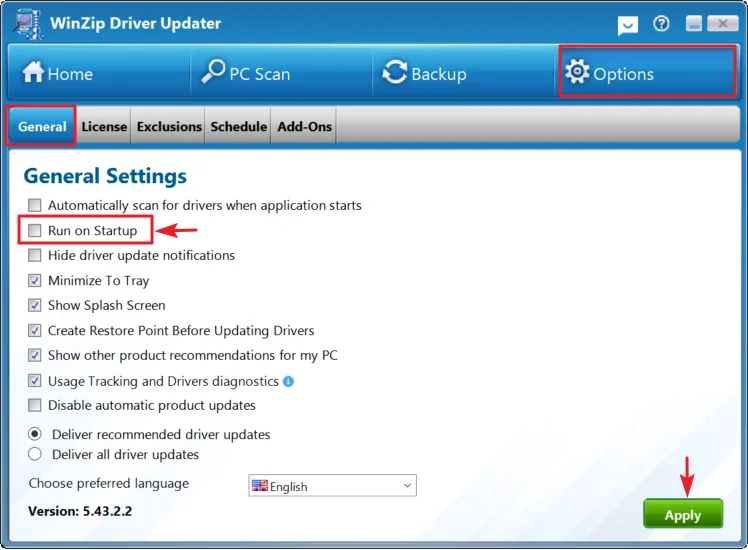
In WinZip Driver Updater, select Options > General, clear the Run on Startup check box and select Apply. The program then stays closed when Windows starts, and you can still open it yourself at any time.
Turn Off Run on Startup in WinZip Driver Updater
- Open WinZip Driver Updater.
- Select Options in the top menu.
- Select the General tab.
- Clear the Run on Startup check box.
- Select Apply.
Or Turn It Off in Windows
You can also stop the program from starting with Windows in the Windows startup list.
- Select Start > Settings > Apps > Startup.
- Find WinZip Driver Updater in the list.
- Set its switch to Off.
Another way: right-click Start, select Task Manager, open the Startup apps tab, select WinZip Driver Updater and select Disable.
How to Tell It Worked
Restart your PC. WinZip Driver Updater does not open by itself. To turn it back on, select the Run on Startup check box again and select Apply.
Related Help
Frequently Asked Questions
Can I still use WinZip Driver Updater after I turn off Run on Startup?
Yes. The setting only stops the program from opening when Windows starts. Open it from the Start menu whenever you want to scan or update drivers.
How do I stop driver update notifications?
Open WinZip Driver Updater, select Options, then the General tab. Select the Hide driver update notifications check box and select Apply.
How do I stop the scan that starts when I open the program?
On the same General tab, clear the Automatically scan for drivers when application starts check box and select Apply.
How often should I scan for driver updates?
We recommend a scan at least once a month. You can set a schedule under Options, on the Schedule tab.
Sources
Related Questions
- Can I Exclude a Driver Update from Being Downloaded and Installed?
- How Do I Create a Schedule to Run Driver Updater?
- How Do I Use WinZip Driver Updater to Update My Drivers? (Quick Guide)
- What Are Device Drivers, and Why Use WinZip Driver Updater?
- How to Upgrade to the Latest Version of WinZip Driver Updater
- How Do I Reinstall Driver Updater on My Computer?