
WinZip Driver Updater
How Do I Create a Schedule to Run Driver Updater?
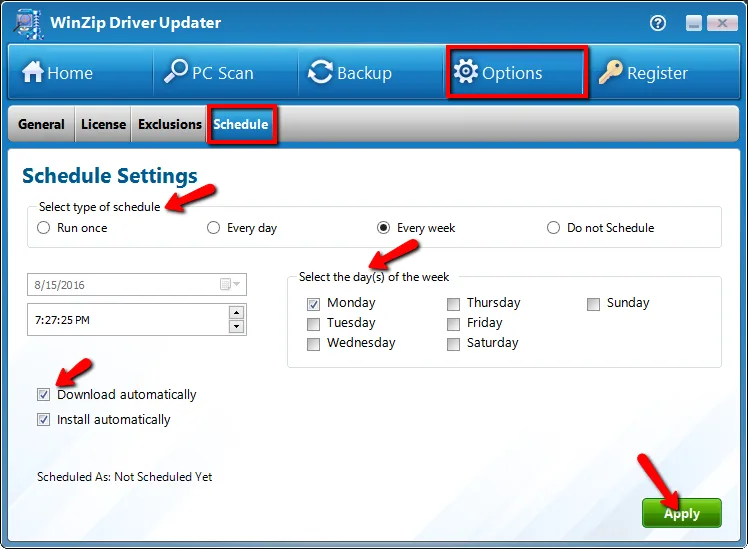
If you would like to create a schedule for WinZip Driver Updater to follow, the program offers an easy to use option.
What you need to do:
- Open “Driver Updater”
- Click on Options
- Select Schedule
- Under the Schedule Settings section, select the Type of schedule and select your preferences.
- Click on Apply
Changing the Schedule:
Simply make changes to the existing schedule and click Apply to save the new settings.
Related Questions
- Can I Exclude a Driver Update from Being Downloaded and Installed?
- How Do I Stop WinZip Driver Updater from Running at Startup?
- How Do I Use WinZip Driver Updater to Update My Drivers? (Quick Guide)
- What Are Device Drivers, and Why Use WinZip Driver Updater?
- How to Upgrade to the Latest Version of WinZip Driver Updater
- How Do I Reinstall Driver Updater on My Computer?