
WinZip Registry Optimizer
How Do I Create a Schedule to Run Registry Optimizer?
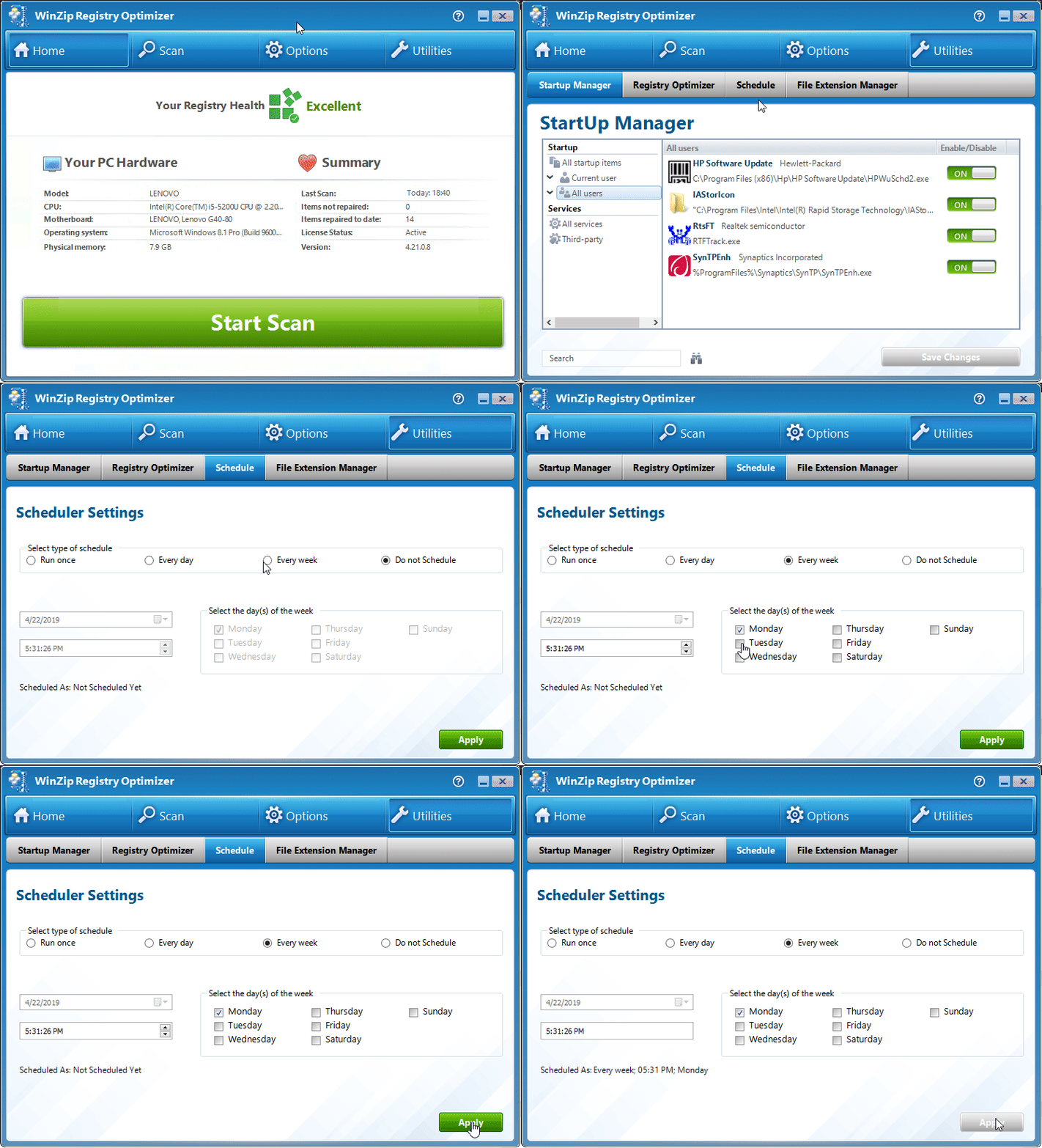
If you would like to create a schedule for WinZip Registry Optimizer to follow, the program offers an easy to use option.
What you need to do:
- Open “Registry Optimizer“
- Click on Utilities
- Select Schedule
- In the Scheduler Settings window that appears, select the Type of schedule and select your preferences.
- Click on Apply
Changing the Schedule:
Simply make changes to the existing schedule and click Apply to save the new settings.
Frequency:
We suggest running Registry Optimizer, at least once every week.
Related Questions
- How Do I Change the Language in WinZip Registry Optimizer?
- How Do I Prevent Registry Optimizer from Running Every Time I Start My Computer?
- How Do I Activate or Register WinZip Registry Optimizer?
- What Is the Windows Registry and Why Use WinZip Registry Optimizer?
- Why Is My WinZip Registry Optimizer License Key Not Accepted?
- How Do I Retrieve a Lost WinZip Registry Optimizer License Code?