
General Questions
How Do I Fix a File Extension or Manage File Extensions on My PC?
System Utilities Suite makes it easy to fix file extension problems and manage all the file extensions on your computer. To access the File Extension Manager, click on the Maintain tile from the Home screen, then click the File Extensions tile.
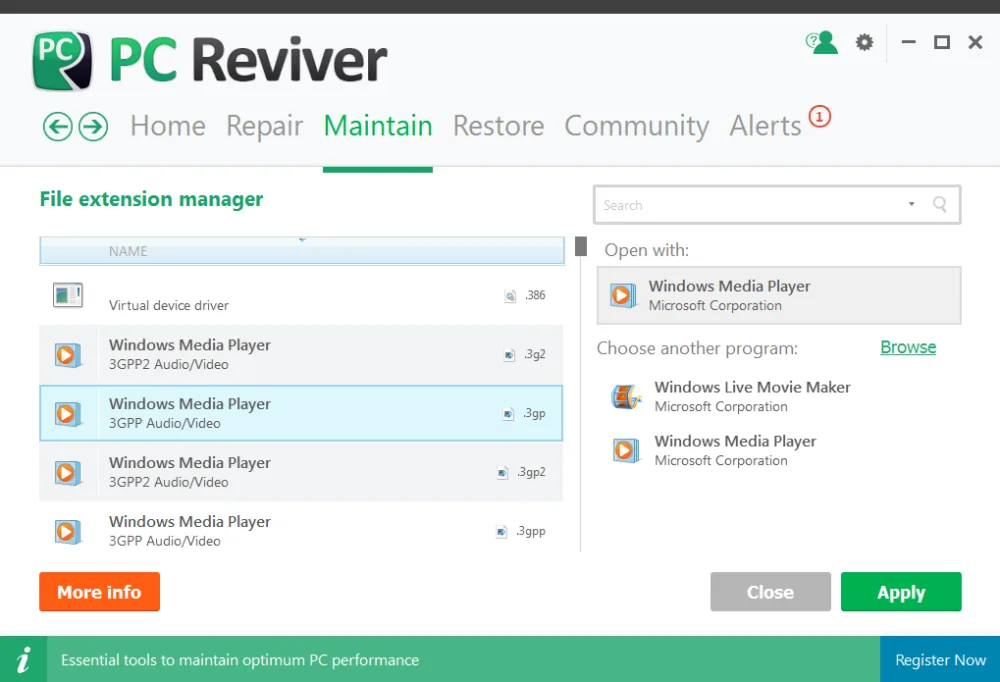
To get started, select the desired file extension on the left pane and click on More Info if you would like to learn more about the extension or browse through the list of programs on the right and select the program you would like to open the file extension with and click on Apply to save your preference.
You now have easy access to managing all the file extensions on your PC.
Related Questions
- How Do I Check to See If Windows Has All the Latest Updates Installed?
- How Do I Clean the Junk Files on My Hard Drive and Free Up Space?
- How to Delete Duplicate Files with Duplicates Finder in WinZip System Utilities Suite
- How to Fix Problems After a WinZip Driver Updater Driver Update
- How Do I Find My Lost WinZip License Code?
- What Is the Community Area in System Utilities Suite?