
General Questions
How Do I Check to See If Windows Has All the Latest Updates Installed?
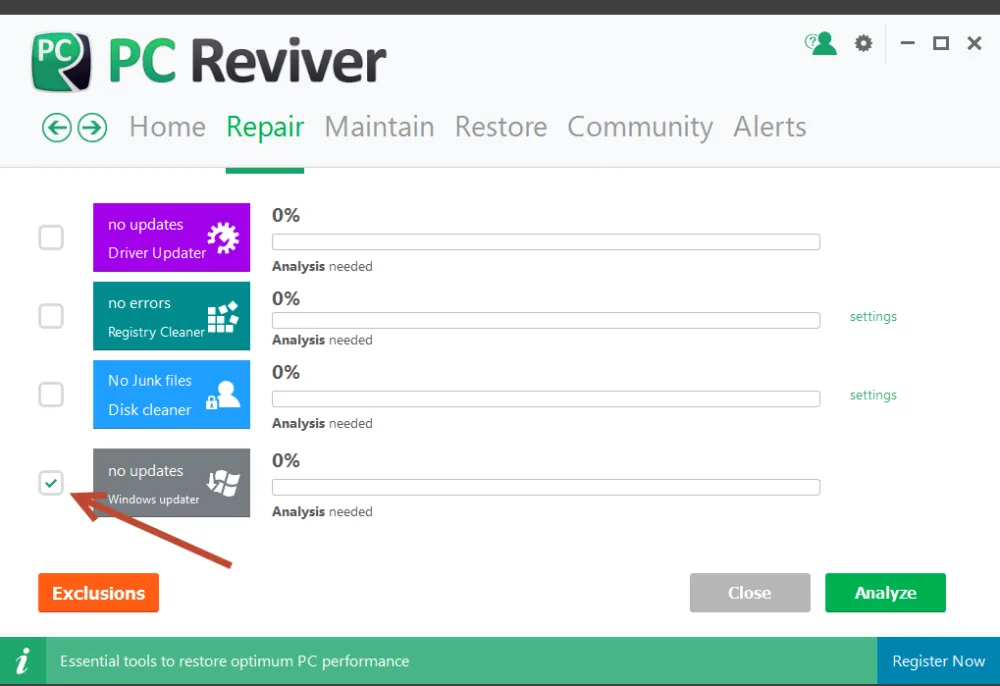
System Utilities Suite has been developed to include the tools to help you perform the essential tasks to restore optimum performance to your PC. This includes a Windows Update checker in the Repair section of the product.
To check for Windows updates, just ensure that the check box is marked, then click Analyze. System Utilities Suite will conduct a thorough scan of your PC to identify available updates, allow you to download and install them, and restore optimum performance and stability to your PC.
Related Questions
- How Do I Clean the Junk Files on My Hard Drive and Free Up Space?
- How to Delete Duplicate Files with Duplicates Finder in WinZip System Utilities Suite
- How Do I Fix a File Extension or Manage File Extensions on My PC?
- How to Fix Problems After a WinZip Driver Updater Driver Update
- How Do I Find My Lost WinZip License Code?
- What Is the Community Area in System Utilities Suite?