
WINZIP DRIVER UPDATER Maximize performance and improve stability of your PC with routine driver updates
- Quickly identify and replace outdated, incorrect and corrupt drivers
- Safely update all outdated drivers with the latest versions from original manufacturers
- Maximize functionality and boost performance of your PC and devices with WinZip Driver Updater.

WinZip Driver Updater will scan, identify and recommend driver updates. It can quickly and easily update drivers to boost performance and improve reliability to your PC
What Does a Driver Updater Do?
A driver updater checks all the drivers on your PC in one scan, finds the ones that are outdated, missing or wrong, and installs newer versions from the companies that made your hardware. Drivers are the small programs that let Windows work with your printer, graphics card, sound card, Wi-Fi adapter and other devices.
How Is It Different From Windows Update?
Windows Update installs drivers for many devices, but it may not offer the newest version from the manufacturer, and some driver updates only appear under Optional updates. WinZip Driver Updater checks every driver at once, shows which ones have newer versions from their manufacturers, and backs up your current drivers before it changes anything.
How It Works
- Download WinZip Driver Updater and run the free scan.
- See which drivers are out of date.
- Update them all with one click. Installing the updates needs a license.
WINZIP DRIVER UPDATER FEATURES AT A GLANCE
Please click on the WinZip Driver Updater screenshots below to enlarge
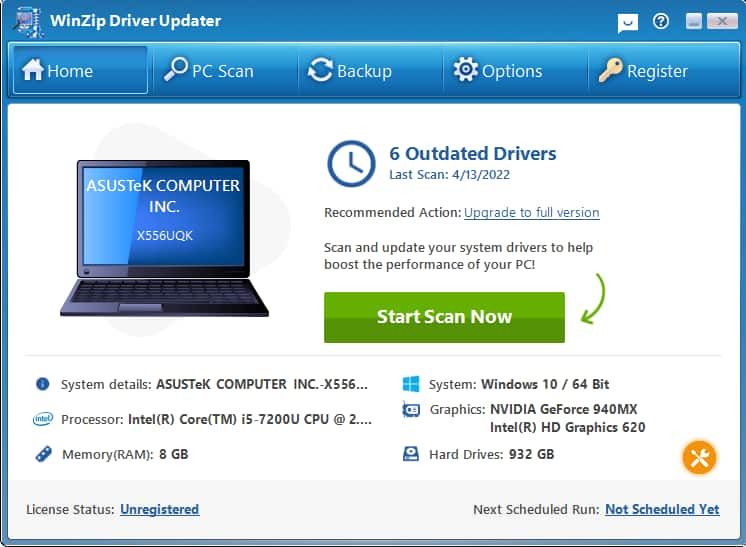
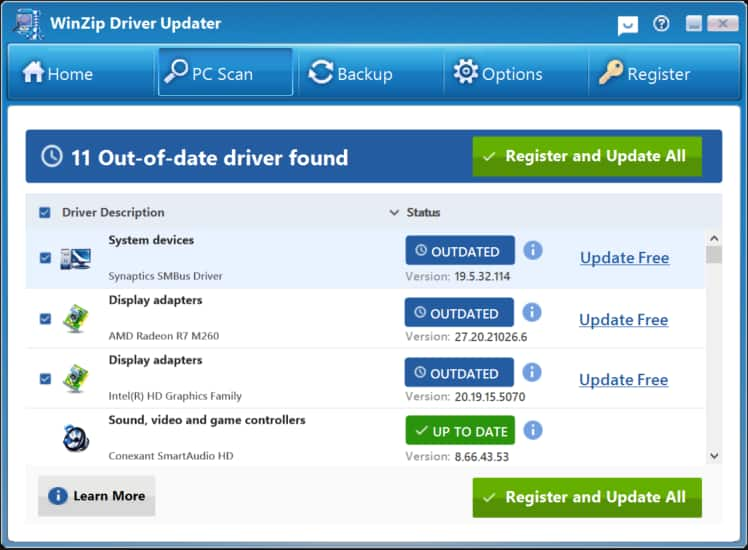
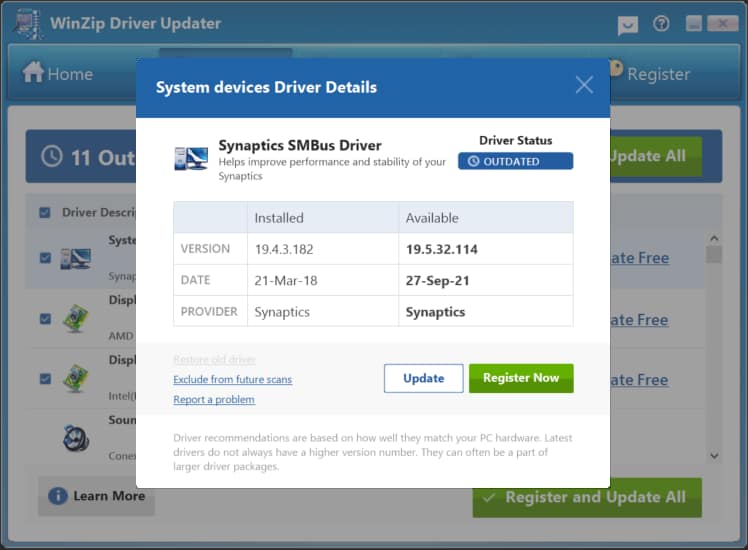

Safeguard your hardware and gain maximum performance with WinZip Driver Updater
Regular scheduled driver updates ensure your system is receiving the most up-to-date bug fixes, power improvements and new features from the original manufacturer's driver updates.

Protect your system from faulty and unreliable aftermarket drivers with driver updates
Installation of erroneous or outdated drivers could seize up your PC and place your system at risk. WinZip Driver Updater will accurately identify and consistently deliver only the correct drivers for your system.

WinZip Driver Updater Saves you time
It can take numerous hours to track down each driver for all the hardware connected to your PC. WinZip Driver Updater achieves this in minutes through a quick scan and driver update process.

A Driver Updater that is Safe and Easy to Use
WinZip Driver Updater includes safety features like automatic backups, restore wizard, exclusions and scheduler to keep your hardware performing worry-free.

A Trusted and Recommended Driver Updater
WinZip Driver Updater is recommended as a trusted solution by industry experts.
 Why update my drivers?
Every time your operating system and software applications are updated, new device drivers are needed to ensure your hardware retains full functionality. Also, many manufacturers do not contact you with information that a new driver has been released leaving you unaware of better functionality, added features or important security patches.
Why use WinZip Driver Updater?
One of the most important features of WinZip Driver Updater is how it sources its driver updates. WinZip Driver Updater sources from the original equipment manufacturer only. Other driver update tools collect from various sources on the Internet and store them on local servers. This means you run the risk of the drivers being out of date or even worse - contain malware or spyware. WinZip Driver Updater ensures you are getting maximum performance from your PC and its components with verified manufacturer device driver updates.
How to Update Your DriversDriver Updater Questions and Answers
What is WinZip Driver Updater?
WinZip Driver Updater is a Windows program from WinZip. It scans your PC for outdated, missing or incorrect drivers and updates them with versions from the original manufacturers. It backs up your drivers first, and you can exclude drivers you do not want to update and schedule regular scans.
Is WinZip Driver Updater safe?
Yes. It is an official WinZip product, and it gets drivers from the original manufacturers only. Before it installs an update, it backs up your current drivers, so a restore wizard can take you back to an old driver if a new one causes a problem. Download it only from this page.
Is WinZip Driver Updater free?
The download and the scan are free. The scan shows which drivers on your PC are out of date. To download and install the updates, you need a license, which is a yearly subscription for one computer. If you are not happy, you can ask for a refund within 30 days of your purchase.
Does Windows 11 have a built-in driver updater?
Windows 11 updates many drivers through Windows Update. To see driver updates that are waiting, go to Settings > Windows Update > Advanced options > Optional updates. You can also update one device at a time in Device Manager. WinZip Driver Updater checks all your drivers in one scan and shows which ones have newer versions from their manufacturers.
Do I need a driver updater?
Windows keeps many drivers up to date on its own. A driver updater helps most when a device stops working well after a Windows update, when you want the newest graphics or sound drivers, or when you don't want to check every device by hand.
Can updating drivers cause problems?
Sometimes a new driver does not work well with your hardware. WinZip Driver Updater backs up your drivers before it updates them, so you can restore the old driver with the restore wizard. In Windows, you can also use Roll Back Driver in Device Manager.
How do I uninstall WinZip Driver Updater?
Open Settings > Apps > Installed apps, find WinZip Driver Updater, select the three dots next to it and select Uninstall. Uninstalling does not cancel a subscription. For more help, see how to uninstall WinZip Driver Updater.