
WinZip Registry Optimizer
How Do I Undo or Restore the Registry Repairs?
If for some reason, the registry repairs have not yielded the desired results or have affected a particular program, you have the option to restore the repair changes by using the Restore feature of WinZip Registry Optimizer.
How to use the Restore feature:
- Open “Registry Optimizer“
- Click on Options
- Select Restore
- From the list shown, select the backup date of the repairs that you need to restore
- Click on the Restore selected backup button
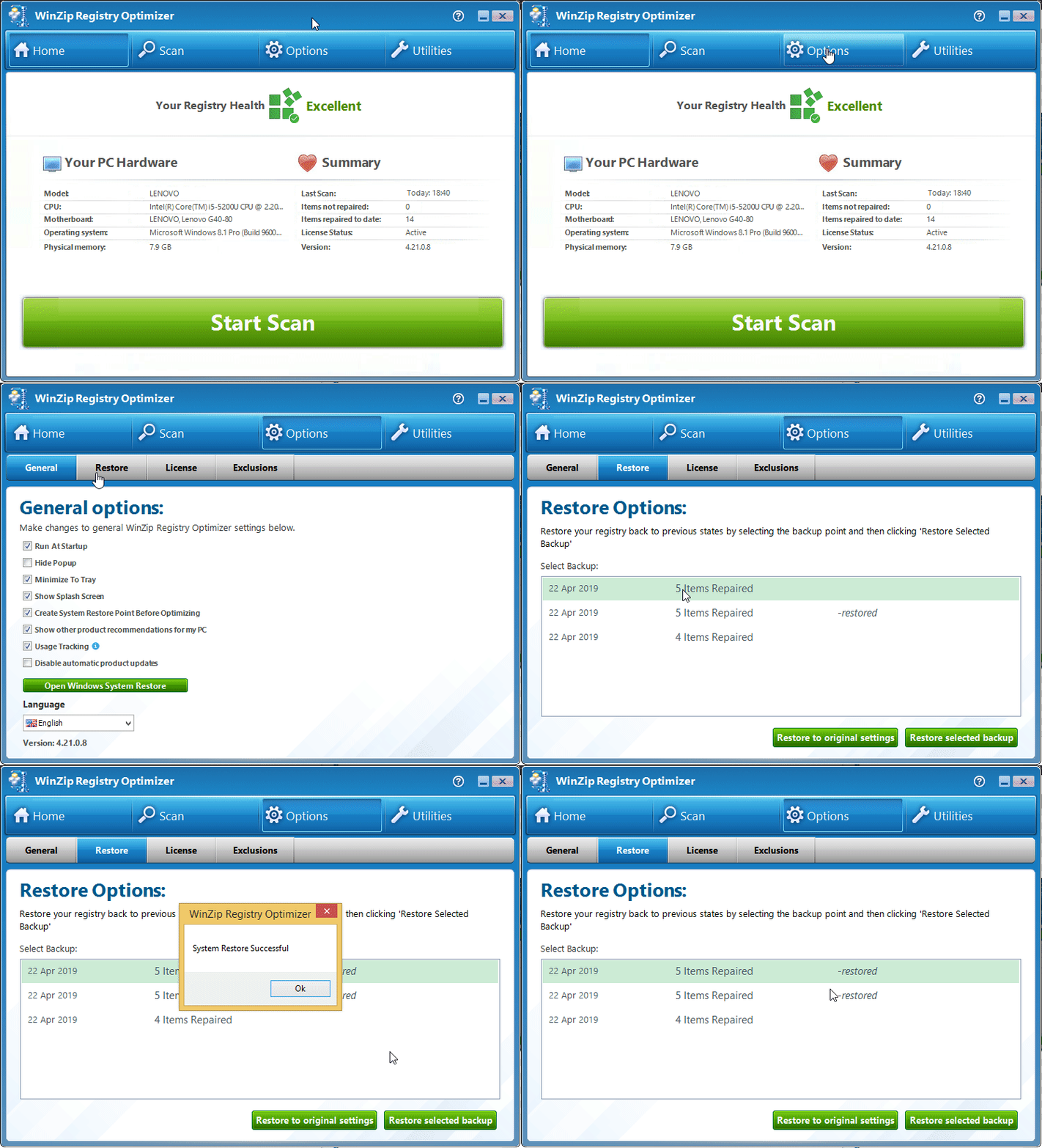
This will successfully reverse the registry repairs from the particular date and time..
Related Questions
- How Do I Exclude or Ignore Registry Issues?
- How Do I Use Registry Optimizer to Scan for Issues and Repair Them? (Visual Guide)
- How Do I Use the Startup Manager to Improve the Start Up Speed (boot Time) of My Computer?
- I Have Purchased Registry Optimizer but It Will Not Remove the Issues Found
- Registry Optimizer Is Unable to Remove All the Issues Detected and Keeps Showing the Same Issues Every Time.
- Registry Optimizer Will Not Complete a Scan or Repair the Issues